

TL;DR:
- You can build a team app without a developer using no-code platforms that generate live interfaces from spreadsheets. These tools automatically infer data models, create forms, workflows, and enable two-way sync with existing systems. It is suitable for tactical, single-process apps, while complex or regulated systems still need developer expertise.
Yes, you can build a working team app without hiring a developer. Modern no-code platforms read your spreadsheet columns, generate a data model, and produce a live interface with authentication, dashboards, and two-way sync — all without a single line of code. Microsoft defines no-code app builders as tools that let nontechnical teammates create functional apps via visual editors and prebuilt blocks.
TL;DR
- Build time: A focused single-process app typically takes a few days to four weeks, depending on data cleanliness and integration complexity.
- Feature coverage: Forms, approval workflows, dashboards, role-based permissions, audit logs, and two-way sync with tools like HubSpot, Stripe, and Jira are all within reach.
- One real limit: Heavy custom UI, real-time transactional systems, or deep regulatory compliance often still benefit from a developer. Start with a tactical department app and you will almost certainly be fine without one.
Gainable is one hands-on option worth knowing: drop a spreadsheet, and it generates a full-stack app from your existing columns.
Table of Contents
- How do modern no-code builders turn spreadsheets into live apps?
- When is no-code enough, and when do you actually need a developer?
- How to build a team app without hiring a developer: 7 steps
- What features should you require from any no-code platform?
- How Gainable turns spreadsheets and tool data into live team apps
- What does it realistically cost and how long does it take?
- Demo checklist: questions to ask during any vendor trial
- Key Takeaways
- Why no-code first is almost always the right call
- Gainable gets your team off spreadsheets fast
How do modern no-code builders turn spreadsheets into live apps?
These platforms do something specific and worth understanding: they read your spreadsheet headers, infer a relational data model, and map that model to a generated UI. You are not building from scratch. You are promoting data that already exists into a real application.
The typical building blocks you get out of the box:
- Schema generation: Columns become fields; field types (text, number, date, dropdown) are inferred automatically.
- Forms and views: List views, detail pages, and input forms are generated from the schema.
- Workflows and automation: Conditional logic, approval chains, and notifications run without code.
- Dashboards: Aggregated metrics and charts pull from live records.
- Auth and permissions: Role-based access controls who sees and edits what.
- Two-way sync: Changes in the app write back to the source (your spreadsheet, CRM, or billing tool), not just the other way around.
Common data sources include Excel files, Google Sheets, and API-connected tools like Salesforce, Airtable, Jira, and Linear. Two-way sync is the key distinction from a one-time import: the app stays current because it is connected, not because someone exported a file this morning.
If you want a deeper look at how visual editors map UI components to data models, the beginner’s guide to visual app builders covers the mechanics clearly.

When is no-code enough, and when do you actually need a developer?
No-code is a strong fit when you have a single, well-defined business process, reasonably clean data, and a team that needs a tactical app rather than a platform. Think: approval flows, task trackers, collections dashboards, inventory logs, or onboarding checklists.
Microsoft’s Power Platform guidance frames it well: no-code solves tactical department problems quickly while freeing developers for high-complexity work. The two approaches complement each other.
Situations where a developer is still the right call:
- Custom complex integrations with legacy systems that have no API
- Real-time transactional systems (payment processing, high-frequency inventory)
- Heavy custom UI or brand-specific design systems
- Extreme scale (millions of records, concurrent users in the thousands)
- Strict regulatory requirements (HIPAA, SOC 2 Type II with custom audit controls)
Signs no-code will work for you:
- Your process already lives in a spreadsheet or a SaaS tool
- Your team is under 200 users
- The workflow has fewer than five distinct steps or roles
- You can describe the app in one sentence
Pro Tip: Before you commit to a platform, look for hidden complexity in your data. If your spreadsheet has merged cells, no unique key column, or duplicate rows, that is a data preparation problem, not a platform problem. Fix it first.
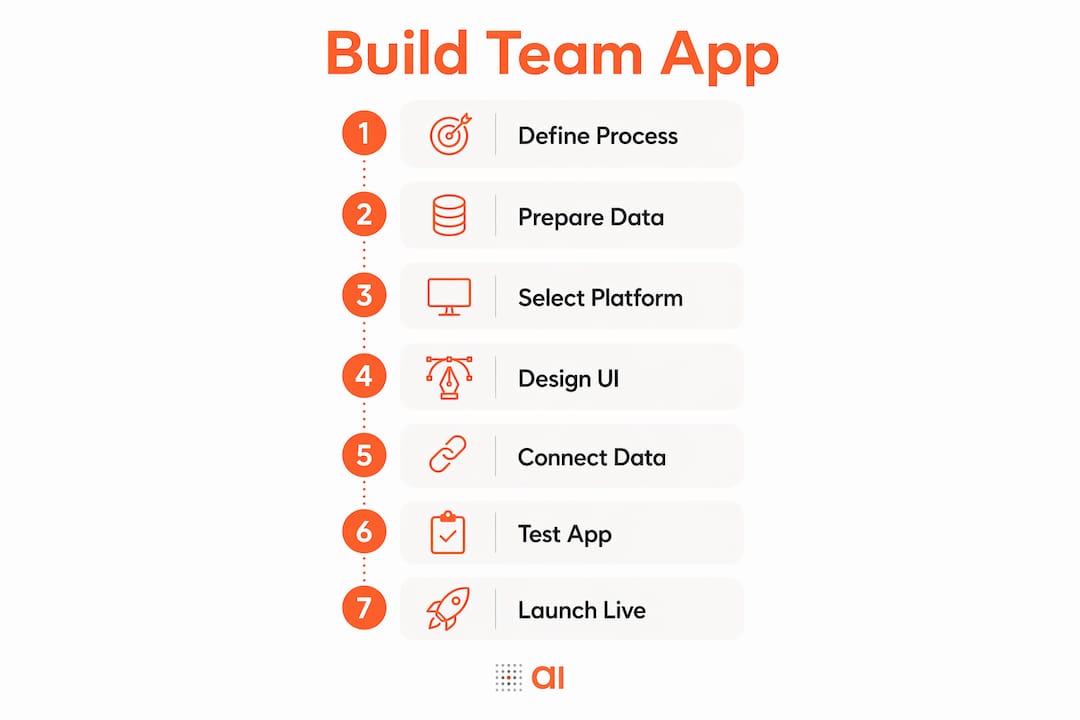
How to build a team app without hiring a developer: 7 steps
Follow these seven steps to move from spreadsheet to live app.
-
Define the single process to automate. Pick one workflow: an approval flow, a task tracker, a collections log. Resist the urge to build everything at once.
-
Audit and clean your spreadsheet. Remove merged cells, standardize headers, and add a unique key column (customer ID, order number, email). This is the most common hidden blocker. The guide to converting a spreadsheet into an app walks through the cleanup steps in detail.
-
Model the data. Identify relationships between tables (e.g., customers → orders → line items). Decide which fields are required, which are optional, and which drive logic.
-
Choose and connect your data sources. Import your spreadsheet or connect your CRM, billing tool, or issue tracker. Confirm two-way sync is active, not just a one-time pull.
-
Design the UI and assign roles. Use the platform’s visual editor to configure list views, detail pages, and forms. Set role-based permissions so sales reps see their records and managers see everything.
-
Add workflows and automations. Configure conditional notifications, approval chains, and any recurring tasks. Gainable’s Gaia Autopilot monitors live data and drafts actions for you to approve, which cuts the recurring manual work significantly.
-
Test with a pilot group, then launch. Run five to ten real test cases with actual users. Check that data writes back to the source correctly, that permissions hold, and that the UI makes sense to someone who did not build it. Define a rollback plan before you go live.
Pro Tip: Start with a micro-app covering just one step of the process. A two-field approval form that actually gets used beats a ten-screen app that nobody opens. Validate adoption first, then expand.
What features should you require from any no-code platform?
Evaluate vendors on the capabilities that actually matter for spreadsheet-to-app projects. Not every platform handles data modeling, sync, or governance the same way.
Must-haves (deal-breakers if missing):
- Two-way sync with your source systems (not just import)
- Role-based access control at the record and field level
- Audit logs that capture who changed what and when
- Built-in database so your app has persistent storage, not just a view layer
Strong nice-to-haves:
- Built-in chat, comments, and file sharing inside records
- Automation agents or workflow triggers
- API access for future integrations
- Import/export and rollback tools for data recovery
- Mobile-responsive views without separate development
Microsoft’s developer guidance reinforces this: governance, versioning, and maintenance planning are required as apps scale, not optional extras. If a platform cannot show you audit logs and versioning in the demo, that is a gap that will hurt you later.
How Gainable turns spreadsheets and tool data into live team apps
Gainable turns spreadsheets and CRM data into full-stack team apps with live updates and built-in collaboration. Drop an Excel file or Google Sheet, and it reads the columns, merges them into a single data model, and generates a working application from what is already there. No prompts. Your columns are the spec.
Key capabilities mapped to the buying criteria above:
- Excel and Google Sheets to app: Gainable’s Excel-to-app flow handles automatic schema generation and UI mapping from a dropped file.
- Two-way sync: Connects to HubSpot, Stripe, Airtable, Salesforce, Jira, Linear, and more, merging records by a key you choose (email, customer ID). The app writes back to the source.
- Built-in database: Persistent storage with live updates, so the app is never stale.
- Gaia Autopilot: Watches your app data for anomalies and drafts actions for approval, reducing routine work.
- Auth, audit logs, and collaboration: Authentication, role-based permissions, audit logs, and in-record chat, comments, and file sharing ship with every app.
“Gainable removes the manual spreadsheet handoffs and gives your team a live application built from the data they already have.”
— Gainable
Gainable is also featured in the 7 best no-code app builders for teams in 2026 roundup, which covers practical tools for teams building from existing data.
What does it realistically cost and how long does it take?
A focused micro-app typically takes a few days to four weeks, with cost driven by platform seat pricing, integration effort, and data cleanup time.
| Project scope | Typical timeline | Cost shape |
|---|---|---|
| Pilot task tracker (one team, one process) | 2–5 days | Platform seat cost only |
| Approval flow with CRM sync | 1–2 weeks | Seat cost + connector setup time |
| Operations dashboard (multi-source) | 2–4 weeks | Seat cost + data cleanup + integration effort |
Gainable’s operations app templates give a concrete sense of what a multi-source workflow app looks like in production.
Costs teams often forget to budget:
- Data cleanup time (often the longest phase)
- User training and change management
- Connector or API fees from third-party tools
- Ongoing governance: reviewing permissions and audit logs as the team grows
Demo checklist: questions to ask during any vendor trial
Use these checks to validate two-way sync, data model control, permissions, automation, and exportability before you commit.
- Can I import my actual spreadsheet right now, in this demo?
- Show me how you handle a column with no unique key.
- Simulate an update from the source system — does the app reflect it live?
- Show me the audit log for a record change.
- Demonstrate role-based views: one user sees their records, another sees all.
- Can I set field-level permissions (hide a column from one role)?
- Show me a workflow trigger: what happens when a status changes?
- What does the automation agent draft, and how does approval work?
- How do I export my data if I leave the platform?
- What happens to my app if I update the source spreadsheet schema?
- Show me the versioning or rollback option.
- What is the uptime SLA and support response time?
Demo script prompt you can copy: “We have a [process name] that lives in a Google Sheet with [X] columns. We also pull data from [CRM/tool]. We need role-based views, two-way sync, and an audit trail. Can you show me that flow live?”
For a broader look at how platforms compare on these criteria, the no-code app builders roundup is a useful reference. You can also explore Firmanager as an example of an operations-focused platform that consolidates multiple business processes.
Key Takeaways
Building a team app without a developer is realistic for any single, well-defined business process with clean data and a no-code platform that offers two-way sync, audit logs, and role-based access.
| Point | Details |
|---|---|
| No-code works for tactical apps | Single-process apps with clean data ship in a few days to four weeks without developer help. |
| Data cleanup comes first | Normalize headers, remove merged cells, and add a unique key before mapping to any platform. |
| Three features are non-negotiable | Two-way sync, audit logs, and role-based access are deal-breakers — verify them in the demo. |
| Start with a micro-app | Automate one step first to validate adoption before expanding to a full workflow. |
| Gainable as your starting point | Drop a spreadsheet at gainable.dev and get a live, governed team app from your existing data. |
Why no-code first is almost always the right call
The teams I see succeed with no-code share one habit: they resist the urge to scope a platform and start with a single painful process instead. The conventional wisdom says you need a developer to build something “real.” What that misses is that most team apps are not engineering problems. They are data organization problems dressed up as software requests. Your CRM data, your spreadsheet columns, your approval chain — that logic already exists. A no-code platform does not invent it; it surfaces it.
The risk is not starting too small. The risk is starting too broad and abandoning the project when complexity hits in week three. A two-screen task tracker that your team actually uses every day is worth more than a twelve-screen platform that nobody opens. Build the micro-app, prove the value, then expand. That sequence works consistently, and it does not require a developer at any stage.
Gainable gets your team off spreadsheets fast
Your spreadsheet already contains the logic for a real app. Gainable reads it, builds the data model, and ships a live team app with authentication, audit logs, and two-way sync to your existing tools. No developer required, no long setup process.
Point Gainable at your Excel file or Google Sheet and get a working app from your existing data. Connect HubSpot, Stripe, Jira, or Salesforce, and every record stays current in both directions. Gaia Autopilot handles the recurring work so your team focuses on decisions, not data entry.
Ready to replace the export-and-email loop? Start with your spreadsheet at Gainable and have a live app running today.